Laptop theft costs businesses and individuals over $2 billion annually—and most of these crimes happen in plain sight. Whether you're working in a coffee shop, library, or shared office space, your device is vulnerable to opportunistic criminals who exploit unguarded moments. The reality is stark: a laptop left unattended for just minutes can vanish, taking your data, productivity, and peace of mind with it.
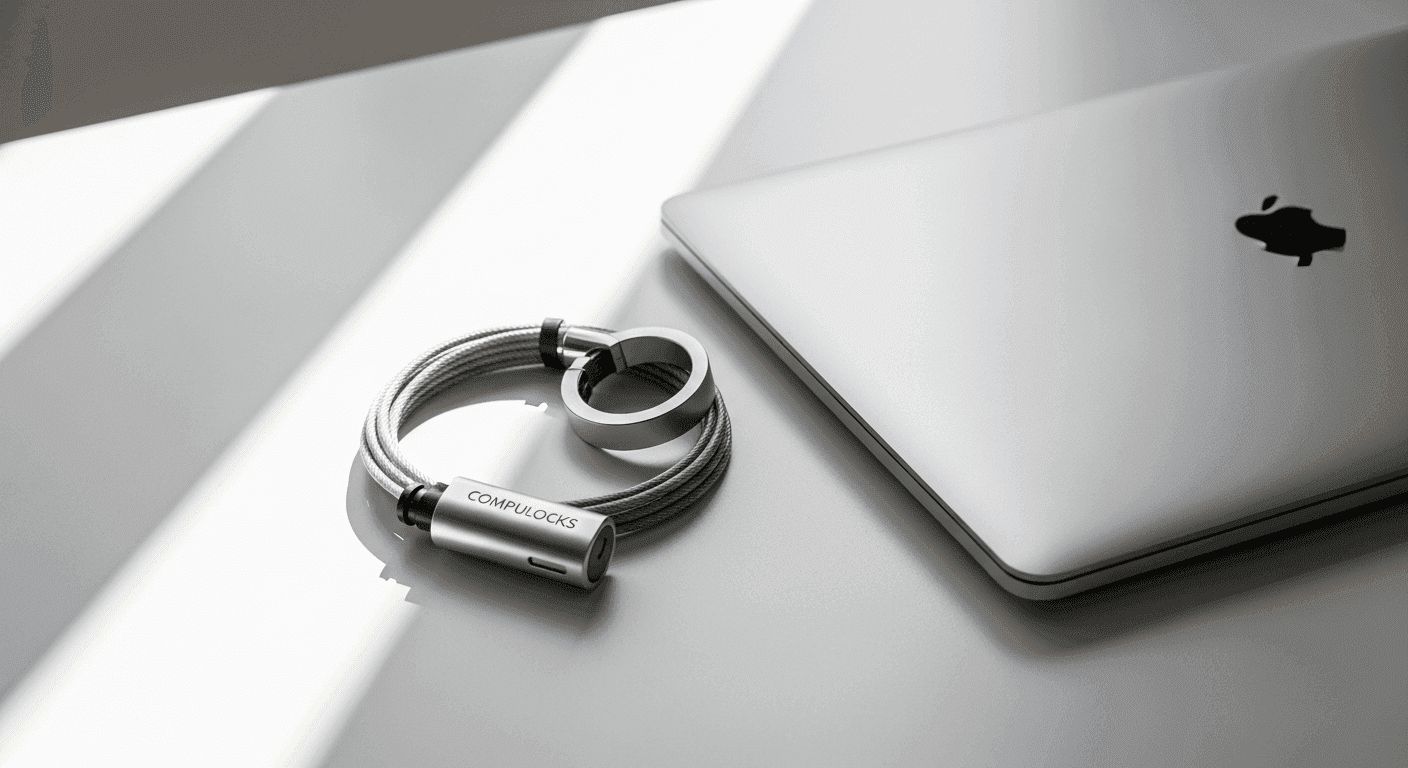
The Compulocks Universal Laptop Security Cable Lock addresses this exact problem with galvanized steel construction, keyless convenience, and broad device compatibility. This physical security solution has earned its place as a best-selling product by delivering reliable protection without the complexity of keyed systems or the hassle of carrying multiple locks for different devices. Rather than hoping no one notices your equipment, you gain a tangible deterrent that signals your devices aren't easy targets.
Why K-Slot Compatibility Matters for Device Security
Understanding K-Slot as the Industry Standard
K-Slot connections have become the industry standard for securing laptops, monitors, and peripherals across manufacturers worldwide. This standardized socket was designed specifically for cable locks, creating a universal anchor point that doesn't require modification to the device itself. When a manufacturer includes a K-Slot, they're essentially building in compatibility with any lock that matches that standard—no adapters, no drilling, no permanent alterations.
How Universal Locks Eliminate Device-Specific Solutions
Before universal K-Slot locks became mainstream, securing multiple devices meant purchasing different locks for each one. A cable lock designed for a Dell laptop wouldn't work with an HP monitor, and neither would fit a printer. Universal K-Slot locks eliminate this problem entirely. One lock can secure your laptop today, your new monitor next month, and a projector at a conference next quarter. This flexibility transforms a cable lock from a single-device accessory into a multi-purpose security investment.
Devices That Feature K-Slot Connections
Modern laptops from major manufacturers—Dell, HP, Lenovo, Apple (newer models), and others—consistently include K-Slot connections. Beyond laptops, you'll find K-Slots on desktop monitors, printers, projectors, and various peripherals. This widespread adoption means a universal cable lock serves dual or triple duty in most office and home environments.
Advantages of Standardized Security Across Manufacturers
Standardization creates efficiency. Your IT department doesn't need to maintain inventory for five different lock types. Educational institutions can secure devices from multiple vendors with a single SKU. When you upgrade or replace equipment, your security infrastructure stays current without additional purchases. This consistency also simplifies training—employees learn one lock mechanism and apply it universally.
Limitations When Devices Lack K-Slot and Adapter Solutions
Not all devices feature K-Slots, particularly older equipment or specialized hardware. For these situations, Compulocks offers "The Blade," an adapter that attaches to devices without built-in K-Slots. While adapters expand compatibility, they add cost and occasional setup complexity. Understanding your device's existing security features determines whether a universal lock works immediately or requires an additional investment.
Cost Savings From One Universal Lock Across Multiple Devices
The financial advantage compounds across time. Instead of purchasing three separate locks for a laptop, monitor, and printer, a single universal cable lock secures all three. Over a year or five years, these savings become meaningful—especially for organizations managing dozens or hundreds of devices. The $24.95 entry-level price point transforms into exceptional value when amortized across multiple endpoints.
Breaking Down the Cable Lock's Core Features and Design
Galvanized Steel Cable Construction and Cutting Resistance
The cable itself represents the lock's backbone. Galvanized steel provides substantial resistance against cutting attempts, discouraging casual theft with tools. The galvanization process coats the steel with zinc, creating a protective layer that resists corrosion and weathering. This durability means the lock maintains its integrity whether secured indoors at a desk or exposed to humidity in a hotel room. The cable's thickness and composition make quick-cut attacks difficult, forcing potential thieves to spend time and effort—precisely what deters opportunistic criminals.
T-Bar Design With Tilting Head and Rotating Cable Mechanics
The T-Bar design distinguishes this lock from basic cable offerings. The tilting head accommodates different device angles and orientations, preventing the awkward positioning that makes some locks uncomfortable to use. The rotating cable adds another practical dimension: as you position your laptop or monitor, the cable rotates freely, preventing the frustrating tangles that plague fixed cables. This mechanical flexibility transforms the lock from a security nuisance into an accessory you'll actually use consistently.
4-Dial Combination Lock Mechanism and Keyless Convenience
A 4-dial combination mechanism eliminates the need to carry or remember where you placed a key. You set your combination once and unlock with those four digits whenever needed. This keyless approach proves especially valuable for mobile professionals who juggle phones, wallets, and work materials. There's no risk of losing a key in transit or forgetting it at your last location. The combination system also works better in shared environments where multiple authorized people need access without key distribution logistics.
Easy Lock/Unlock Switch for Quick Access
The lock features an intuitive switch mechanism that allows quick locking and unlocking without fiddling with the cable or mechanism. When you need to grab your laptop and move, the lock disengages smoothly. When you step away, engaging it takes seconds. This frictionless interaction encourages consistent use—security measures that create friction often get abandoned, defeating their purpose entirely.
Cable Rotation Technology That Prevents Tangling
Cable tangling isn't merely an annoyance; it damages the cable, creates weak points, and makes the lock harder to use daily. The rotating cable technology means wrapping the lock around a desk leg or security rail doesn't create permanent kinks or knots. The cable moves freely, maintaining structural integrity and ensuring the lock remains reliable across years of use.
Durability Testing and Long-Term Reliability Expectations
Compulocks' reputation rests on products that withstand daily use. The galvanized steel cable, precision-engineered locking mechanism, and quality construction components suggest a device designed for five-to-ten-year lifespans rather than single-year products. The lack of moving parts beyond the cable rotation and combination dial means fewer failure points and greater reliability.
Comparison of Combination Locks Versus Keyed Alternatives
Combination locks prioritize convenience; you never lose your access method because it exists only in memory. Keyed locks offer a perception of higher security for some users, though security experts note both approaches provide equivalent physical protection when manufactured to the same standards. Compulocks offers both options, allowing you to choose based on personal preference. The keyless convenience of the 4-dial combination appeals to most mobile users and offices with multiple authorized users.
Real-World Performance in Different Environments
Office Settings: Protecting Workstations and Shared Equipment
Corporate environments present constant temptation for device theft. Employees move between meetings, leaving laptops at desks. IT equipment sits in open storage areas. The cable lock transforms these vulnerabilities into non-issues. A secured laptop at a desk signals "this device is protected" more effectively than any sign. In open office layouts where dozens of people pass through daily, this visual deterrent prevents most opportunistic theft.
Educational Institutions: Securing Student and Faculty Devices
Universities and schools face particular challenges managing borrowed equipment and personal devices. Students bring laptops to libraries and dormitories. Faculty members leave equipment in offices during office hours. A universal cable lock lets institutions provide security across diverse device types without complex asset management systems. The affordability matters too—when protection costs $25-$60 per device, institutions can protect entire labs and classrooms.
Public Spaces: Libraries, Coffee Shops, and Co-Working Environments
These environments generate the $2 billion in annual laptop theft losses. Coffee shop workers stay focused on drinks, not the wifi network. Library patrons step away to fetch books. Co-working members network in common areas, leaving devices unattended. A cable lock tethers your laptop to a fixed object—a table leg, chair, or security rail—making grab-and-go theft impossible. Even a two-minute bathroom break becomes safe.
Travel Scenarios: Hotel Rooms and Conference Venues
Hotel room security extends beyond the door lock. Housekeeping staff, maintenance workers, and other guests create risk factors. Securing your laptop to a radiator, desk, or fixed furniture prevents casual theft during brief absences. Conference venues present similar challenges: you attend a session, leaving your device in a common area or break room. A cable lock secures it against room-clearance theft that happens at large events.
Home Office Setups: Protecting Personal and Family Devices
Home offices blur boundaries between personal and professional devices. Family members, visitors, service workers, and delivery personnel create potential vulnerabilities. Securing your work laptop to your desk prevents accidental use by others or intentional theft by workers or guests. Parents can secure children's devices, preventing theft and unauthorized access.
Multi-Device Protection: Securing Monitors, Printers, and Peripherals Simultaneously
Laptops attract attention, but monitors, printers, and projectors represent significant investments. The universal K-Slot compatibility means a single cable lock installation point can anchor multiple devices. Thread one cable through your monitor's K-Slot and a printer's K-Slot, both secured to the same desk anchor point. This multi-device protection maximizes security investment.
Deterrent Effect Against Opportunistic Theft Versus Organized Crime
The Compulocks Universal Laptop Security Cable Lock primarily addresses opportunistic theft—the individual who sees an unattended device and acts on impulse. For organized theft rings with power tools and systematic approaches, no consumer-grade cable lock provides complete protection. However, organized crime typically targets bulk inventory, not individual devices in public spaces. For 99% of users facing realistic threats, the cable lock's deterrent effect against opportunistic criminals proves sufficient.
Pricing, Value, and Budget Considerations for 2026
Entry-Level Pricing Starting at $24.95 for Compact Versions
Compulocks' pricing structure begins remarkably low. At $24.95, even budget-conscious individuals or small businesses can afford device security. This price point proves especially attractive for students protecting laptops they depend on for coursework. The affordability removes "cost" as an excuse for leaving devices unprotected.
Mid-Range Options and Universal T-Bar Models
The T-Bar design with advanced features typically prices between $40-$60. This mid-range investment adds tilting head, rotating cable, and enhanced materials compared to basic models. For professionals who use the lock daily and value ergonomic features, this pricing remains accessible while offering meaningful improvements.
Cost-Per-Device Analysis When Protecting Multiple Electronics
If you're securing three devices—a laptop, monitor, and printer—with three separate locks, you're spending $75-$180. With one universal cable lock at $50, you protect all three, reducing per-device security costs to approximately $17. This economics favor households and offices with multiple K-Slot-enabled devices.
ROI Calculation: Security Investment Versus Replacement Costs
A mid-range laptop costs $800-$1,500. A monitor adds $200-$500. A printer ranges $300-$800. If the cable lock prevents even one theft across its five-year lifespan, it pays for itself thousands of times over. When you calculate the replacement cost, setup time, data recovery expenses, and productivity loss, a $50 lock becomes the smartest investment you'll make in device security.
Accessibility for Individual Users Versus Enterprise Bulk Purchasing
Individual users benefit from reasonable pricing that doesn't require justification to a purchasing committee. Enterprises buying in bulk negotiate volume discounts, potentially reducing per-unit costs further. The pricing structure serves both markets effectively, making security accessible whether you're protecting one laptop or one hundred.
Seasonal Pricing Trends and Promotional Opportunities
Back-to-school season (August-September) typically brings educational pricing. Year-end corporate budgets may offer bulk-purchase discounts. New Year promotions capitalize on security resolutions. Monitoring these seasonal trends can yield modest savings on already affordable pricing.
Long-Term Value Proposition and Durability-to-Cost Ratio
A $50 lock that lasts five years costs $10 annually. Over that span, it provides invisible protection—you notice it only through its absence when you unlock. The durability-to-cost ratio favors this investment compared to other security approaches. Even the entry-level $25 model, lasting three years, costs roughly $8 annually for comprehensive device security.
Securing Your Electronics With Confidence
The Compulocks Universal Laptop Security Cable Lock delivers straightforward, dependable protection for your valuable devices without breaking the bank or complicating your workflow. Its galvanized steel construction, intuitive T-Bar design, and universal K-Slot compatibility make it a practical choice for offices, schools, and mobile professionals. Whether you're protecting a single laptop or securing an entire fleet of peripherals, this cable lock provides the physical deterrent that stops opportunistic thieves in their tracks.
The $2 billion annual cost of laptop theft doesn't need to include your devices. With entry-level pricing starting around $24.95 and mid-range models offering enhanced features at $40-$60, the financial barrier to security essentially disappears. The real cost of not protecting your equipment—lost data, replacement expenses, productivity disruption—dwarfs the investment in a quality cable lock.
Your devices represent hours of work, sensitive information, and financial assets. They deserve protection that matches their value. The combination of affordability, durability, and ease of use makes the Compulocks Universal Laptop Security Cable Lock the logical choice for anyone serious about device security.
Secure your valuable electronics today with the Compulocks Universal Laptop Security Cable Lock.